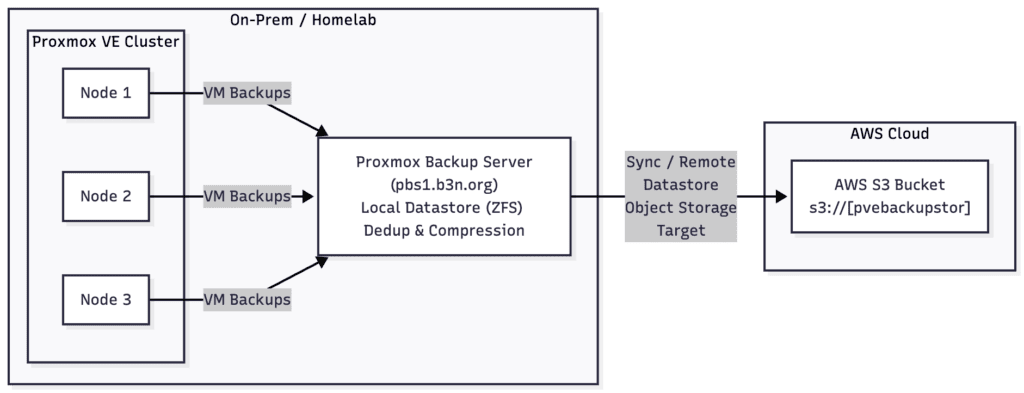
My Proxmox backup strategy has been to backup all the VMs to an onsite Proxmox Backup Server (PBS). Then sync that backup daily to a remote PBS server–this works well–but it requires maintaining a remote server.
However…
Proxmox Backup Server (PBS) added Sync to S3 object storage as a Tech Preview with their latest 4.0. So I’ve been experimenting with this… and if it continues to test well, my backup strategy will be to backup Proxmox VMs to my local PBS server, then replicate those backups offsite to AWS S3.
AWS S3 Costs
For reference, my VM backups have about 400,000 objects; 500GB of data, and 100GB of that changes frequently. AWS S3 Standard is expensive, but I can use S3 Intelligent Tiering to automatically move infrequently accessed objects to cheaper storage… so while the first 6 months will cost more, this is going to be a decade-long backup solution. Based on what I’ve seen so far… my estimated prices will end up being…
S3 Archive Access Storage 301GB x $0.0036/mo = $1.08
S3 Infrequent Access Storage 152GB x $0.0125/mo = $1.90
S3 Frequent Access Storage 82GB x $0.023/mo = $1.87
S3 Standard (Object Overhead) 9GB x $0.023/mo = $0.21
Intelligent Tiering Automation Fee = 400,000 x $0.0000025 = $1
Total monthly cost = $6.08.
Update 2026-06-04 – after running this over 6-months, my actual monthly cost settled around $6.30.
If I ever had to restore, I estimate the egress fees would be about $45. …not horrible for something I’ll need to do rarely. Likely, never.
S3 Deep Archive
Another way to drop the cost further is to allow the objects to lifecycle into S3 Glacier Deep Archive, which would bring it down to $5.27.

For me, a 48-hour delay is acceptable. If I’m restoring from S3 we’re in a catastrophic scenario (e.g. fire, multiple drive failure, or Borg invasion) where I’d have to order new hardware to restore to anyway. We’re still looking at the same egress fees because restoring Deep Archive files is free when using Intelligent Tiering.
AWS S3 Bucket Setup
To set this up in AWS, create an S3 bucket like normal. Since PBS is not capable of uploading to the Intelligent-Tiering storage class, create a lifecycle rule to transition all objects to Intelligent-Tiering on Day 1. I also setup a 7-day period to version objects after they’re deleted.

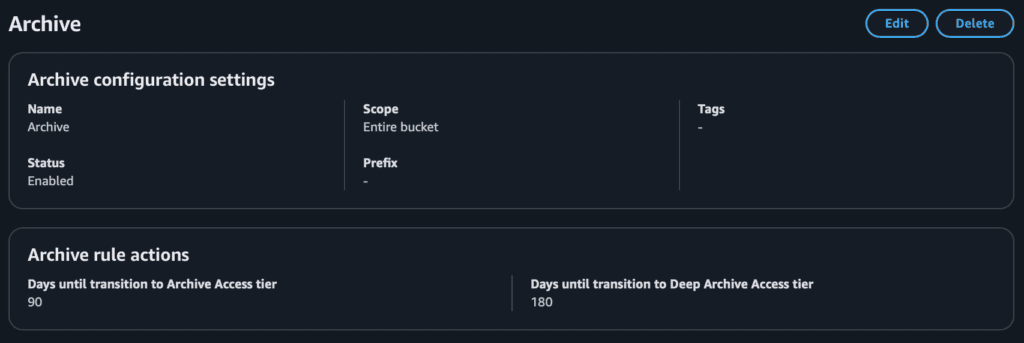
Then setup the archive configuration (optional). I set mine to transition to Archive Access Tier after 90 days, and Deep Archive Access tier after 180-days.
If you should ever need to restore, Proxmox is not expecting items to be in Deep Archive, so it’s best to restore them first which you can do with s3cmd–the thaw should be free since these objects were put into deep archive by intelligent-tiering.
s3cmd restore --recursive --restore-priority=bulk s3://yourpvebackupstor/After 48 hours the files can all be restored.
Proxmox Backup Server Setup
Add an S3 Endpoint, us endpoint format:
{{bucket}}.s3.{{region}}.amazonaws.com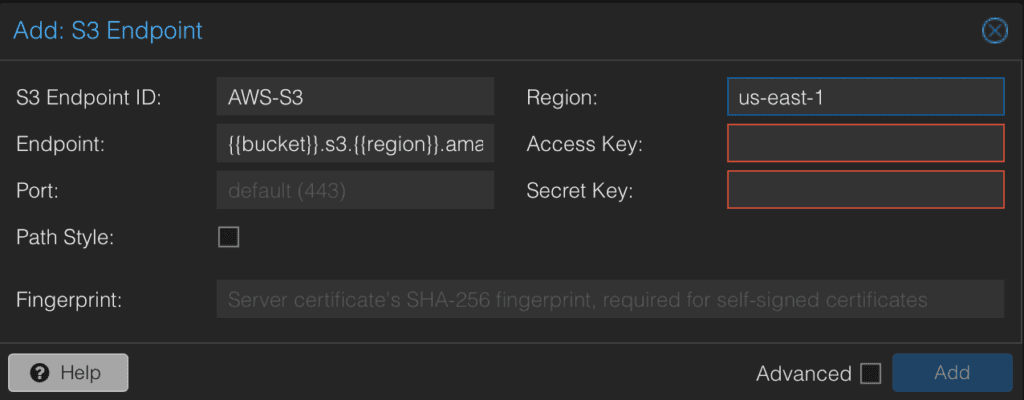
Add an S3 Datastore

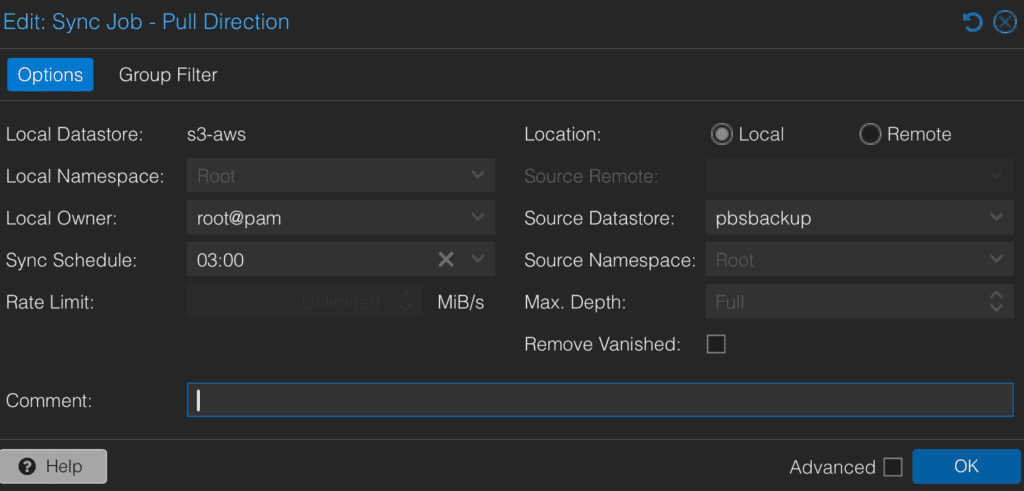
Select the “AWS PBS Backup” Datastore (I called it s3-aws in the screenshot below), and add a Sync Pull Job. Select your local Proxmox Backup datastore “pbsbackup” to S3.
I should note, that this is still a tech preview. So use at your own risk. However, most of the issues I’ve read about seem to be related to an earlier release of PBS, or not using a tier 1 cloud provider like AWS, Google Cloud, Azure, etc. One provider in particular that I think would be good for this use case is Google Cloud. Their Archive tier is $0.0012/GB. It’s a little more expensive than Azure and AWS’s $0.00099, but with Google, restores from their archive class are instantaneous.
Proxmox Backup Server is the best open-source VM backup solution I’ve used. It is a robust and comprehensive solution, but easy to setup. Having an S3 target as a datastore makes the solution even simpler.
Hi! This isn’t directly related to Proxmox, but – I noticed the newsletter subscribe link gives an error code 526 (Invalid SSL certificate). Might be worth updating if the newsletter is still a thing.
Thanks, Stephen! I was having trouble with auto-cert renewal and thought I had fixed it a few weeks ago–but apparently not. It’s “fixed” again and I’ve added monitoring for that cert.
Ben
Arte you using direct internet access or have a proxy in the middle?
Hi, Sergio. I believe direct internet access. To clarify, Proxmox VE and Proxmox PBS have no exposed public ports and are both run on the local network. Proxmox VE backs up to my local Proxmox PBS, and Proxmox PBS then is connected to an Amazon S3 bucket. Let me know if I didn’t understand the question!
I was interested in using S3 throught proxy, that fucntionality is new in PBS 4.2, see here: https://forum.proxmox.com/threads/pbs-4-2-0-1-s3-datastore-creation-fails-behind-http-proxy.183720/#post-854324